

In German cooperative banks, back-office workload is often driven by routine micro-tasks: classifying incoming documents, capturing form and customer numbers, and routing files to the correct processing destination. Performed thousands of times across daily operations, these small manual steps add up to significant operational effort.
German cooperative banks, particularly Volksbanken and Raiffeisenbanken, are structurally comparable to U.S. credit unions. Both are member-oriented banking organizations built around a cooperative ownership model. The systems, regulation, and market structures differ, but credit unions are the closest U.S. counterpart.
Quick Definition: What are Atruvia and agree21?
Atruvia is the central IT and digitalization provider for Germany’s cooperative banking sector. Its technology supports Volksbanken and Raiffeisenbanken across a broad range of banking operations.
agree21 is Atruvia’s core banking environment and forms part of the operational technology landscape used by German cooperative banks. It supports day-to-day banking processes and connects multiple applications and process areas across the institution.
For the document workflows discussed in this article, agree21 DMS is particularly relevant. It is used for document management and archiving, where files must be stored together with the correct customer, form, routing, and indexing information.
Paperfly connects to the agree21 environment via API. The Paperfly AI Inbox can recognize incoming documents, extract required information, apply the bank’s internal business rules, and transfer both the document and its structured metadata into the appropriate agree21 destination.
In this article:
Why Inbound Processing Still Creates Significant Workloads in German Cooperative Banks
Documents reach German cooperative banks through multiple channels: branch scans, email attachments, portal uploads, and physical mail. Before a document can reach the correct destination, employees often need to identify its type, capture relevant information, assign it to the correct customer, and determine where it needs to go next.
These preparation steps consume substantial operational capacity when repeated across high daily document volumes.
Where Manual Effort Accumulates Today
- Review: Opening files, identifying document types, and understanding the underlying business context
- Data Capture: Reading form IDs, customer numbers, reference numbers, or other relevant attributes
- Customer Assignment: Linking documents to the correct customer or account relationship
- Routing: Determining the responsible advisor, functional queue, process, or organizational unit
- Handoff: Preparing documents and metadata for downstream processing or archiving
Which Intake Steps Can Be Automated?
Inbound document processing consists of a series of repetitive steps. The Paperfly AI Inbox combines document recognition, extraction, business rules, internal mappings, and Human-in-the-Loop review to automate these steps from intake through handoff.
Key tasks automated by the Paperfly AI Inbox include:
- Document Capture: Branch scans, email attachments, and web uploads can be collected and processed through a common intake layer.
- Document Splitting and Grouping: Multi-page scan batches can be separated into individual documents while related pages remain grouped together.
- Document Classification: Paperfly identifies which document type has been received.
- Field Extraction: Relevant information such as form numbers, customer numbers, case references, amounts, names, dates, and other document-specific attributes can be extracted automatically.
- Business Rule Application: Extracted values are evaluated against internal mapping tables, ownership logic, routing rules, and process requirements.
- Exception Handling: Missing, ambiguous, or conflicting information can generate a structured Human Task for review.
- Target Routing: Documents and metadata can be prepared for the appropriate agree21 destination, DMS archive structure, advisor responsibility, or downstream process.
Four Core Elements of Operational Inbound Automation
The operational value comes from connecting recognized document information directly with the bank’s existing rules, responsibilities, and target systems.
- Automate Customer and Advisor Mapping: Customer identifiers can be linked with internal advisor assignments or responsibility structures so documents reach the correct owner automatically.
- Use Extracted Data Directly for Archiving: If Paperfly identifies a customer number and the form number of a customer document, those values can be used immediately to prepare the document for correct indexing and archiving.
- Embed Bank Knowledge into AI Flows: Internal mapping tables linking form numbers, form names, routing destinations, or other bank-specific attributes can be maintained as resources within Paperfly AI Flows.
- Deliver Structured Data to agree21: Paperfly prepares the document together with extracted and enriched metadata for transfer into the bank’s existing agree21 environment.
How Documents Automatically Find the Correct agree21 Destination
Recognizing that a file is a specific form, agreement, or customer document is only part of the process. The information extracted from the document must also be connected with the bank’s internal structure so that it reaches the correct destination.
The Paperfly AI Inbox extracts attributes such as form numbers, customer numbers, and other routing-relevant information and evaluates them against the bank’s internal mapping tables and business rules.
Depending on the bank’s configuration, the result may be an archive assignment, a functional work queue, an advisor responsibility, or another downstream process destination.
Automated Routing Mapping Example
| Extracted Identifier | Internal Business Logic | Target Outcome |
|---|---|---|
| Form ID 4711 | Internal form mapping | Assigned archive or processing destination |
| Customer ID 123456 | Customer lookup | Correct customer record |
| Advisor ID 815 | Responsibility rule | Responsible advisor or team |
| Ambiguous Assignment | Exception rule | Human Task for verification |
The Paperfly AI Inbox combines extracted document information with internal banking logic. When the assignment is clear, the document and its metadata can continue automatically into the appropriate agree21 process or archive structure.
How Banking Documents Are Recognized Automatically
Different document types require different recognition methods. Standardized banking forms may contain barcodes, form numbers, or clearly defined machine-readable fields. Other documents arrive in changing layouts or as completely unstructured correspondence.
For standardized documents, barcodes and deterministic identifiers provide a fast and reliable way to identify form numbers, customer references, or other structured attributes.
OCR converts printed information into machine-readable text. AI models add another layer by interpreting semantic context, identifying document types across varying layouts, and locating required information even when its position changes from one document to another.
Straight-Through Processing vs. Specialist Review
Document recognition alone does not determine whether a case should continue automatically. The Paperfly AI Inbox can also evaluate confidence levels, required information, conflicting values, and internal bank rules.
If the result is complete, plausible, and permitted by the configured process logic, the document can continue automatically.
Human-in-the-Loop provides controlled handling of exceptions. If relevant information is missing, values conflict, confidence is insufficient, or an internal control rule requires manual sign-off, Paperfly creates a structured task for an employee.
Banks can also define mandatory review points for specific document types or process categories regardless of recognition confidence.
How Staff Can Verify Extracted Information Directly in the Document
When an employee needs to review a result, the extracted value should be easy to verify. The Paperfly AI Inbox can link recognized information directly to its source location in the original document.
Form numbers, customer numbers, names, amounts, dates, and reference information can be visually highlighted in the document view.
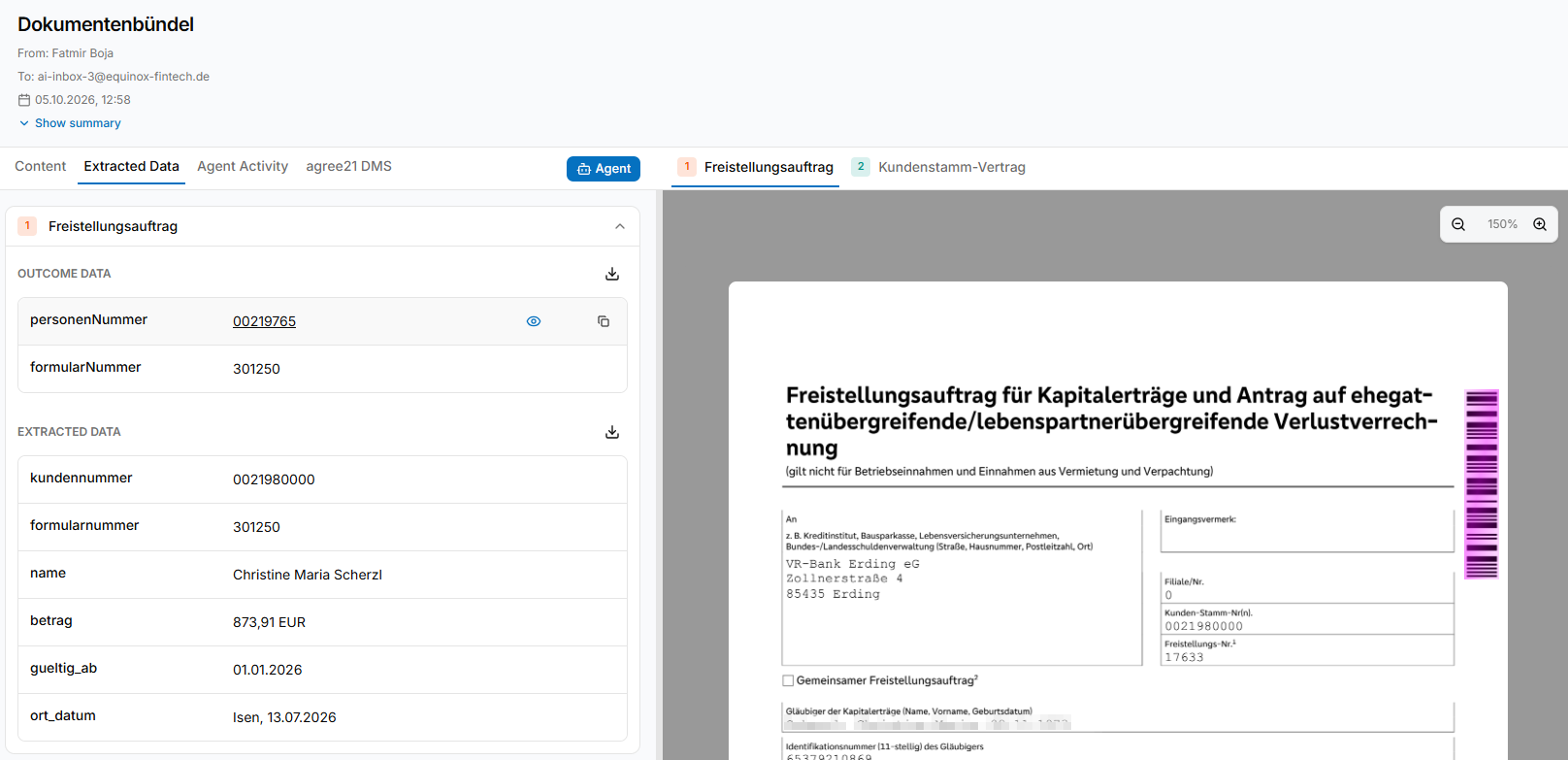
This makes exception review significantly faster. Instead of searching through the entire page, employees can immediately see where a value was found and compare the AI result with the original source.
Field Traceability Examples
| Extracted Attribute | Visual Display in Document | Operational Benefit |
|---|---|---|
| Form ID | Source location highlighted | Fast verification of document assignment |
| Customer Number | Relevant text or barcode region highlighted | Immediate comparison with customer data |
| Customer Name | Name field highlighted in the original file | Quick visual validation |
| Transaction Amount | Extracted amount highlighted | Fast validation of financial values |
| Expiration Date | Date field highlighted | Immediate validity check |
| Reference / Case ID | Relevant source section highlighted | Faster verification of reference information |
Real-World Example: From Branch Scan to DMS Archiving
Consider a typical scenario in a German cooperative bank: a customer submits paper documents at a branch. An employee scans the document bundle using a multi-function device and sends the files to the Paperfly AI Inbox.
Paperfly separates the documents, identifies their types, extracts required information such as form and customer numbers, applies internal mappings, and prepares the files and metadata for transfer into the bank’s agree21 environment.
Step-by-Step Workflow:
- Scan Ingestion: A multi-page PDF reaches the Paperfly AI Inbox.
- Document Splitting: Individual documents are identified and related pages are grouped correctly.
- Classification and Extraction: Paperfly recognizes the document type and extracts relevant information such as form numbers or customer identifiers.
- Customer Assignment: The extracted customer number is used to link the document to the correct customer record.
- Archive and Routing Logic: Form numbers, internal mappings, and bank-specific rules determine the appropriate archive structure, process destination, or responsible organizational unit.
- Validation: Paperfly checks whether the required information and routing result are sufficiently clear for automated continuation.
- Straight-Through Processing: Clear cases continue automatically into the defined agree21 destination.
- Exception Review: Ambiguous or incomplete cases generate a Human Task for an employee.
Handling Non-Standard and Freeform Documents
Not every document received by a bank follows a standardized form layout. Legal notices, court documents, customer correspondence, and other freeform documents may contain the required information in completely different locations.
Examples of more complex document scenarios include:
- Government and Legal Notices: Relevant information appears inside longer, unstructured legal text.
- Variable External Layouts: Equivalent data appears in different positions depending on the sender.
- Freeform Customer Letters: The document type and intended process must be derived from the overall content.
- Garnishment Orders: Several related entities such as debtor, creditor, claim amount, and case number must be recognized together.
- Ambiguous Assignments: Missing or conflicting information triggers targeted employee review.
- Mandatory Control Steps: Internal risk or control policies can require human approval even when the extracted information itself is clear.
Takeaway: Automating Inbound Processing in German Cooperative Banks
The Paperfly AI Inbox connects document recognition directly with operational processing. Extracted form numbers, customer identifiers, and other relevant information can be evaluated against internal bank rules and mapping tables to determine the appropriate next step.
For German cooperative banks using agree21, this means incoming documents can be prepared for customer assignment, routing, processing, and DMS archiving without employees manually handling every intermediate step.
Frequently Asked Questions
What is the U.S. equivalent of a German cooperative bank?
U.S. credit unions are the closest structural counterpart to German cooperative banks such as Volksbanken and Raiffeisenbanken. Both follow a member-oriented cooperative model, although their legal, regulatory, and banking infrastructures differ.
What is agree21?
agree21 is the core banking environment provided by Atruvia for Germany’s cooperative banking sector. It supports a broad range of banking operations. Within the document workflows covered here, agree21 DMS is particularly relevant because documents and their associated metadata can be transferred there for management and archiving.
What role does Atruvia play?
Atruvia is the central IT and digitalization provider for Germany’s cooperative banking sector. It develops and operates banking technology used by Volksbanken and Raiffeisenbanken, including the agree21 environment.
How can German cooperative banks automate inbound document processing?
Scans, email attachments, and web uploads can be processed through the Paperfly AI Inbox. Paperfly identifies document types, extracts relevant information, applies internal rules and mappings, and determines the appropriate customer, archive structure, routing destination, or next process step.
How can documents be transferred into agree21 DMS?
Once a document has been classified and the required metadata has been extracted and validated, Paperfly can prepare the structured document payload for transfer into the bank’s agree21 environment via API. The exact target and indexing logic depend on the bank’s configuration.
How is the correct agree21 destination determined?
Paperfly combines information extracted from the document with the bank’s own mapping tables and business rules. Form numbers, customer identifiers, advisor assignments, and other attributes can be used to determine the appropriate archive structure, functional queue, responsible employee, or downstream process.
How are banking documents without barcodes processed?
Paperfly can combine OCR with AI-based document understanding. OCR converts printed content into machine-readable text, while AI models interpret the document context and identify relevant information across varying layouts.
When does an employee need to review a result?
Employee review can be triggered when required information is missing, values conflict, the assignment is ambiguous, confidence is insufficient, or internal control rules require manual approval. Clear standard cases can continue automatically.